Stay Total Report by Post Type
Report Parameters
|
Field |
Description |
|---|---|
|
Report Name |
The name of the report. |
|
Building Codes |
A drop-down list consisting of all the building codes. All building records created in the Building Codes (Settings à Setup à Room à Building Codes) screen are displayed as options in the drop-down list. Users can select multiple or all the building codes from the list to be displayed in the report generated. |
|
Department |
A drop-down list consisting of all departments defined by the property. |
|
Room Type |
A drop-down list consisting of all the room types. Users can select multiple or all the room types from the list to be displayed in the report generated. |
|
Selected Guest Type |
A drop-down list consisting of all the guest types for the report selection. |
|
Select Postings Date |
The date for which the report must be generated. |
|
Report Options |
Available options include the following:
|
|
Include Revenue |
When enabled, revenue details are included in the report. |
Sample Report
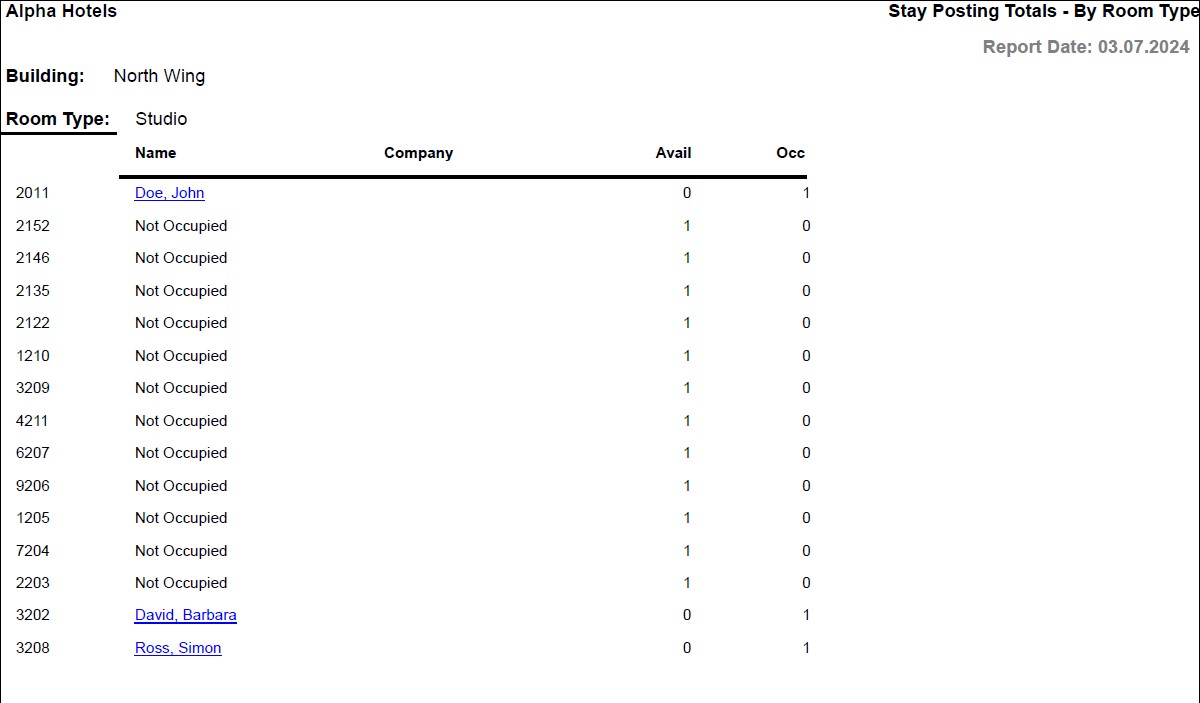
Report Fields
|
Field |
Description |
|---|---|
|
Building |
The building at which the room is located. |
|
Room Type |
Room type selected for the reservation. |
|
Name |
The last name and first name of the guest added to the reservation will appear as a hyperlink and clicking it will navigate the user to the guest record. |
|
Company |
The name of the company to which the guest belongs. |
|
Avail |
The number of rooms that are available for booking. |
|
Occ |
Percentage of occupied rooms. Rooms Occupied (paid rooms + comp rooms) divided by Adjusted House. |
|
Revenue |
The revenue earned from each room. |
|
Average Revenue |
The average room revenue. |
|
Total For Room Type |
The sum totals for each of Avail, Occ, Revenue, Average Revenue is displayed under the respective columns for room types. |
|
Total For Building |
The sum totals for each of Avail, Occ, Revenue, Average Revenue is displayed under the respective columns for building codes. |
|
Total For Report |
The sum totals for each of Avail, Occ, Revenue, Average Revenue is displayed under the respective columns for report. |